YH SpectralProcessor

Automatic resonance suppression for mixing and mastering. It finds the frequencies that ring and reduces only those, as they happen.

  • Version 1.6.1October 2026
  • VST3 and standaloneAny VST3 host
  • Windows 10 and 1164-bit
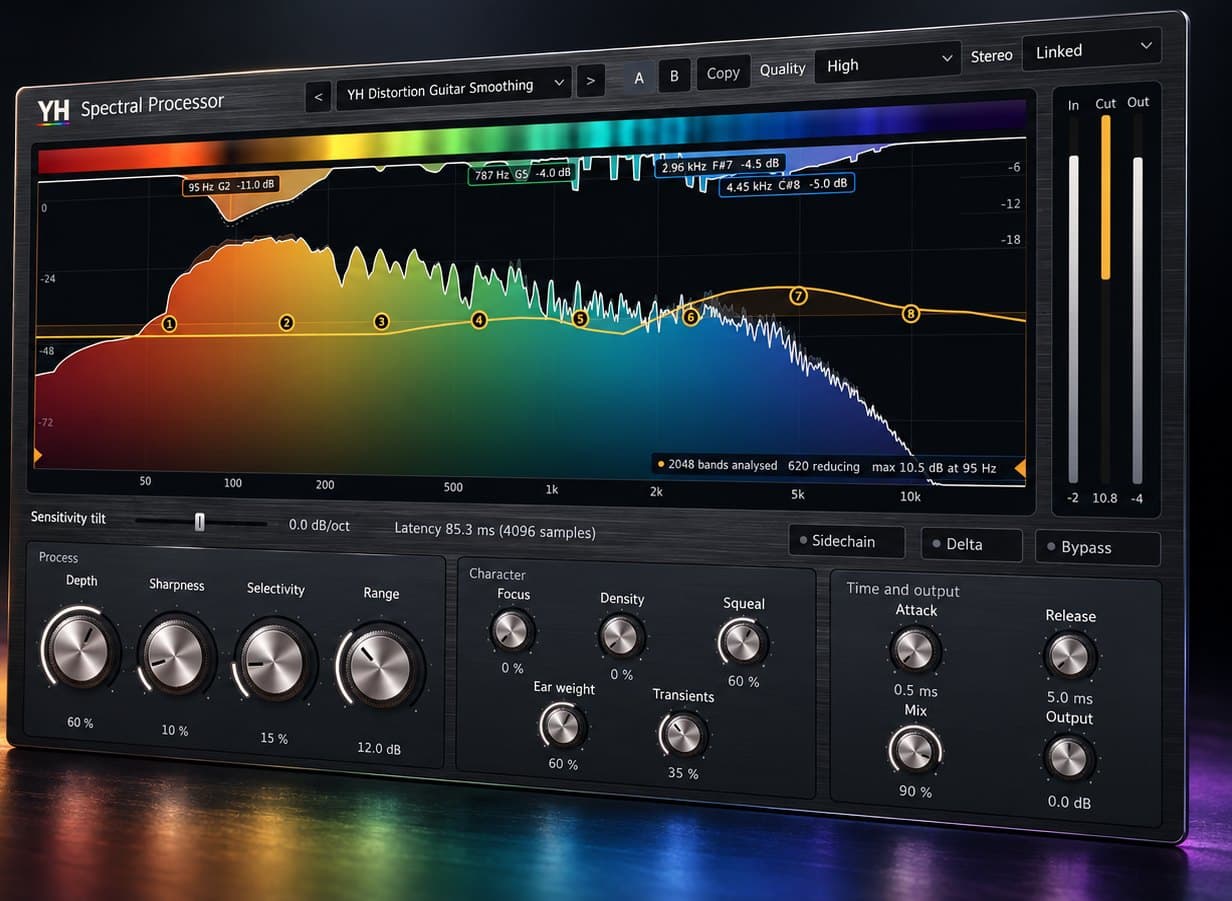
YH Spectral Processor plug-in window showing the live spectrum and the resonances it is reducing

What happens inside, step by step

The whole process is on screen. Scroll through the window to see what each part does.

  1. It hears every band

    2048 frequency bands are analysed continuously, and the display paints the spectrum from low to high as it plays.

  2. It cuts only what rings

    Frequencies that stand out from their surroundings are reduced the moment they appear. Each active cut hangs from the top of the display with its frequency, note and depth.

  3. You decide where it listens

    Up to eight sensitivity bands make detection keener or gentler in any range. Double-click to add one, drag to move it, type a value or a note name.

  4. You hear what it removes

    Delta plays only the removed signal, so Depth and Selectivity are set by ear. Bypass turns the whole window black and white, so you always know which you are hearing.

  5. You shape how it behaves

    Depth, Sharpness, Selectivity and Range set the processing. Focus, Density, Squeal, Ear weight and Transients decide what counts as a resonance. Attack, Release and Mix set how it moves.

  6. You see the result

    Input, reduction and output meters show exactly how much is happening, so a gentle setting stays gentle.
Where it earns its place

  • VocalsHarsh edges and nasal build-ups, smoothed without losing presence or air.
  • Distorted guitarsFizz and ringing chords under control, with a dedicated Squeal control for finger squeaks and feedback whistles.
  • Drums and roomsRinging toms, harsh cymbals and room boom, tamed hit by hit.
  • Mix bus and masteringGentle, wide control of build-ups across a full mix, with latency compensated by your DAW.

Why I built it

Resonances are the frequencies that ring out of a recording: the harsh edge on a vocal, the fizz on a distorted guitar, the boom of a room. They move with every note, so a static EQ either misses them or cuts too much.

YH Spectral Processor analyses the signal in 2048 bands and reduces only the frequencies that stand out from their surroundings, moment by moment. The live display shows exactly what it is cutting, and Delta lets you hear only what is being removed.

I built it for my own mixing work, and I use it on vocals, guitars, bass, drums and full mixes.

Details

  • ProcessDepth sets how much the resonances are reduced, Selectivity how far a peak must stand out before it is touched, Sharpness how focused the cuts are and Range the most any band can be reduced.
  • CharacterFocus, Density, Squeal, Ear weight, Transients and Protect notes shape what counts as a resonance: how the spectrum is weighted to the ear, whether transients pass through and how musical notes are protected.
  • Time and outputAttack and Release set how fast the cuts react and recover. Mix blends the processed and original signal, and Output sets the final level.
  • Sensitivity curveDouble-click the display to add a band, up to eight. Drag to move it, Shift for fine moves, the mouse wheel for width, and type exact values, including note names. Tilt and low and high cuts shape the whole curve.
  • Stereo and sidechainProcess Linked, Unlinked or Mid/Side, or let another signal drive the detection through the sidechain input.
  • Workflow56 factory presets grouped by source, from vocals and guitars to drums and full mixes, A/B comparison with copy, and a display that turns black and white when the plug-in is bypassed.

Download

  1. Close your DAW.
  2. Extract the zip. The plug-in will not load from inside it.
  3. Copy the folder "YH Spectral Processor.vst3" to C:\Program Files\Common Files\VST3. Windows will ask for permission.
  4. Open your DAW and rescan plug-ins.
Version
1.6.1
Format
VST3 plug-in and standalone app
System
Windows 10 and 11, 64-bit
Size
3.5 MB
Licence
Personal and commercial use
Download for Windows
Verify your downloadCompare the SHA-256 of your zip with this one:DDEA56E825B01FADD29F53792EB37B00F43E023C9D937F1542D800CFAC7BF7F5
Requirements
  • Windows 10 or 11, 64-bit
  • A DAW that loads VST3 plug-ins. Pro Tools needs AAX, which this version does not include.
  • Nothing else to install: the runtime is built in.

Version history

  1. 1.6.1The Init preset starts from a perfectly flat sensitivity curve.
  2. 1.6Sensitivity bands are added on demand, up to eight, with modern EQ-style editing and typed values.
  3. 1.5Protect notes control. Black and white display when bypassed.
  4. 1.4Squeal control. Ultra low latency mode, about 5 ms.
  5. 1.3Stronger low-frequency detection. Eight-band sensitivity curve and factory presets grouped by source.

Questions

Does it work in Pro Tools?

Not at the moment. Pro Tools needs AAX, and this version is VST3 and standalone.

Does it work on a Mac?

Not yet. This version is for Windows 10 and 11, 64-bit.

Will the latency put my tracks out of sync?

No. The plug-in reports its latency to your DAW, which compensates automatically. To record through it, switch to the ultra low latency mode.

What is the licence?

Use it on personal and commercial work at no cost. It may not be resold or redistributed, so please share this page rather than the file itself.

My browser warned me about the download.

Browsers are cautious with new programs that are not yet code-signed. Keep the file, then compare its SHA-256 with the one on this page to confirm it is the original.