YH MIDIHumanizer

MIDI that sounds played. Every part of a programmed song comes back with the velocity, timing and feel of real players, while the dynamics you wrote stay where you put them.

  • Version 6.1October 2026
  • Standalone appWorks with any DAW
  • Windows 10 and 11Nothing else to install
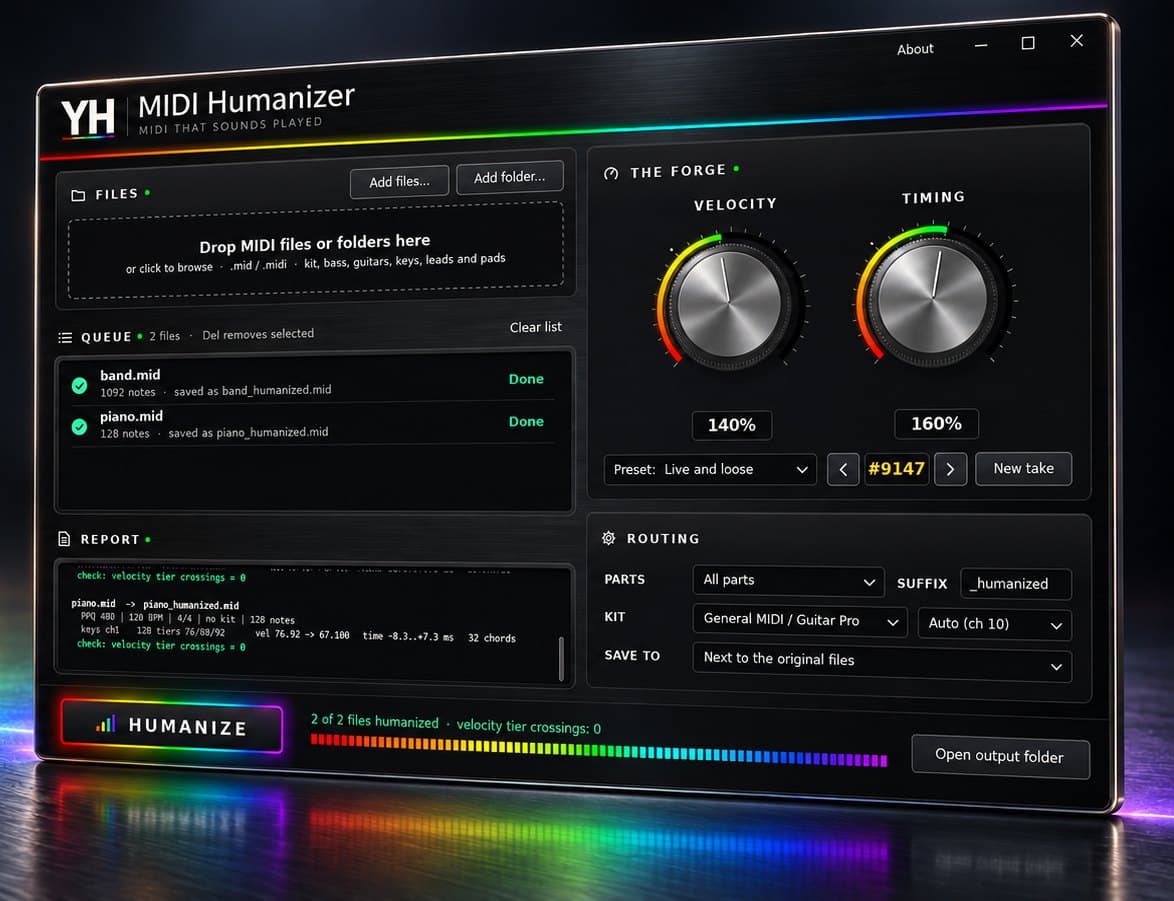
YH MIDI Humanizer app window after humanizing a full band file

From programmed to played, step by step

The whole process is on screen. Scroll through the window to see what each part does.

  1. Drop in a song

    Drop MIDI files or whole folders onto the window. Every part of the song is read: kit, bass, guitars, keys, leads and pads.

  2. Set the feel

    Velocity sets how much the dynamics move, Timing how far notes drift off the grid. Presets run from a tight studio take to a loose live one.

  3. Choose what to touch

    Humanize every part, the kit only or the melodic parts only. The kit is found automatically, and custom kit maps cover other sample libraries.

  4. Press Humanize

    Each result is saved next to the original with your suffix. Your original files are never changed.

  5. Every file accounted for

    The queue shows each file, how many notes it holds and where the result was saved.

  6. Proof, not guesswork

    The report lists every part with its velocity levels before and after and its timing range, and confirms that no velocity levels crossed.
What it does to each part

  • KitVelocity per piece with hand and foot alternation, laid-back backbeats and early crashes.
  • BassSits with the kick, with alternating fingers on runs.
  • GuitarsChords are strummed, down on the beat and up in between, in 8ths or 16ths.
  • KeysThe melody note leads the chord, and the hands are never perfectly together.
  • LeadsPhrases follow the contour of the line, with a lift at the start of each phrase.
  • PadsGentle movement only, so sustained parts stay smooth.

Why I built it

Programmed parts are perfect in a way no player is: every note at the same level, every hit on the grid. Random velocity and timing do not fix it, because real players are not random. They accent the beat, alternate hands and fingers, strum chords and lean into phrases.

YH MIDI Humanizer works out what each part is, from the track name, the instrument and the way it is played, and humanizes it the way that instrument is played. The velocity levels you wrote, such as ghost notes and accents, never cross, so the performance changes while the arrangement stays yours.

Every result is repeatable. The same take number and settings always give the same file, and New take gives a different performance with the same feel.

Details

  • Velocity and TimingTwo knobs set how much the dynamics move and how far notes drift off the grid, in milliseconds. Timing at OFF keeps your grid exactly. Presets cover Natural session, Studio tight, Live and loose, and Velocity only.
  • TakesEach result has a take number. The same number and settings always give the same file, and New take gives another performance with the same feel.
  • PartsHumanize all parts, the kit only, or the melodic parts only, leaving the other side exactly as written.
  • KitAuto finds the kit on channel 10 or on a channel that plays like a kit. General MIDI and Guitar Pro mapping is built in, and custom maps cover other sample libraries.
  • Always keptControllers, sustain pedal, pitch bend, program changes, tempo and time signatures stay exactly as written, and your original files are never changed.
  • ReportEvery file gets a report: each part, its velocity levels before and after, its timing range, and a check that no velocity levels crossed.

Download

  1. Extract the zip to a folder, for example Documents\YH MIDI Humanizer.
  2. Run "YH Midi Humanizer.exe". There is no installer.
  3. If Windows shows "Windows protected your PC", click More info, then Run anyway. The app is not code-signed.
Version
6.1
Format
Standalone Windows app
System
Windows 10 and 11
Size
1.2 MB
Licence
Personal and commercial use
Download for Windows
Verify your downloadCompare the SHA-256 of your zip with this one:8E210985E3309F6D3AF22D11C936E679C31B74E299A3E3D7EDB7F561DC344968
Requirements
  • Windows 10 or 11
  • .NET Framework 4.x, already part of Windows 10 and 11
  • Standard MIDI files from Guitar Pro, any DAW or notation software

Version history

  1. 6.1Humanizes every part of a MIDI file: kit, bass, guitars, keys, leads and pads. Parts selector, and automatic kit detection with a No kit option.
  2. 6.0New interface in the YH design. Download package with a readme and licence.

Questions

Which programs does it work with?

Any program that exports and imports standard MIDI files: Guitar Pro, Cubase, Nuendo, Ableton Live, FL Studio, Reaper, Studio One and others.

Will it change my tempo?

No. Tempo, time signatures and every controller stay exactly as written. If a result plays faster or slower in your DAW, set the project to the tempo of the file before importing it.

Can I humanize only some parts?

Yes. Set Parts to Kit only, or to Melodic parts only to leave the kit as written.

My kit uses another channel or sample library.

Pick its channel under Kit. For libraries that do not follow General MIDI, edit kitmap-gm.txt from the download and load it as a custom map.

What is the licence?

Use it on personal and commercial work at no cost. It may not be resold or redistributed, so please share this page rather than the file itself.

My browser warned me about the download.

Browsers are cautious with new programs that are not yet code-signed. Keep the file, then compare its SHA-256 with the one on this page to confirm it is the original.